 Domain SearchInstantly check and register your perfect .pk or international domain
 Web HostingGet a .pk domain for as low as PKR 467
 cPanel HostingUser-friendly hosting powered by cPanel
 Reseller HostingLaunch your own hosting business with minimal technical requirements
 Windows HostingOptimized for Windows-based applications and websites
 Affiliate ProgramEarn referral commissions by promoting our services
 Domain TransferMigrate your existing domain seamlessly with zero downtime.
 All DomainsAccess 324+ top-level domains (TLDs) worldwide from a single platform
 Whois LookupIdentify the owner of any domain using our whois and rdap lookup tool
 Managed VPS Hosting
 AI Website BuilderCreate beautiful websites effortlessly using intuitive drag-and-drop features
 Online ShopLaunch a professional online shop with no technical skills required
 SSL CertificatesEncrypt data, build trust, and boost SEO.
 BlogDiscover expert guides on hosting, websites, SEO, and digital growth strategies
 ContactGet instant assistance via live chat or email
 SupportAccess help articles, tutorials, and service documentation
You open your own website on your phone to show a client what you have built.
Three seconds pass. Then four. By five seconds, the page is still loading, and you can feel the moment slipping. The client’s attention has already moved on.
This is the reality for many WordPress sites in Pakistan.
The site works, eventually, but that delay is costing the business visitors, leads, and Google rankings it should be earning.
Studies consistently show that 53% of users abandon a site that takes more than three seconds to load.
For mobile users, who make up the vast majority of Pakistani internet traffic, that tolerance is even lower.
Here is what most site owners do not realise: a slow WordPress hosting in Pakistan is rarely purely a WordPress problem.
The root cause is almost always the hosting environment.
Everything else, the plugins, the images, the theme are also important, but the server your site lives on sets the ceiling for how fast it can ever be.
This guide breaks down the six most common reasons your site is slow and provides the fix for each, including which host actually solves the problem at its core.
1)Your Hosting Plan Is the Real problem
There is no optimisation technique in the world that can fully compensate for a slow or overcrowded server.
Budget shared hosting plans in Pakistan often stack hundreds of websites on a single machine.
When one site on that server sees a traffic surge, every other site slows down too, regardless of how well optimised they are.
The specific technology the host uses matters enormously.
Traditional Apache web servers process WordPress requests one at a time.
LiteSpeed, by contrast, handles multiple requests simultaneously and includes its own built-in caching layer at the server level, before WordPress even loads.
Pair that with NVMe SSD storage, which reads and writes data up to five times faster than standard SSDs, and the difference in load time is not marginal.
It is the difference between a site that loads in under two seconds and one that crawls to life in six.
The fix
Move to a host that runs LiteSpeed with NVMe SSD storage.
Truehost’s WordPress hosting is built exactly on this stack, LiteSpeed servers, NVMe drives, 99.9% uptime, free SSL included, and plans starting from PKR 1,500 per year.
One-click WordPress installation means you are live in under five minutes, and the speed improvement over budget shared hosting is immediate.
2) Images Are Loaded at Full Size
Images are the single most common cause of slow page loads on individual sites.
The problem is almost always the same:
A high-resolution photo uploaded directly from a phone or camera, scaled down visually inside WordPress, but still being delivered to every visitor at its original file size.
A visitor on a mobile connection in Karachi or Lahore is downloading a 4MB image that should be 120KB.
The fix is two-part.
First, compress all existing images using a plugin such as Smush or ShortPixel, which can bulk-process your entire media library in minutes.
Second, convert images to WebP format, a modern format developed by Google that delivers the same visual quality at roughly 30% smaller file size.
Both steps are available within free WordPress plugins and require no technical knowledge.
Enable lazy loading at the same time, so images below the fold only load as a visitor scrolls to them, rather than all at once on page load.
3) There Is No Caching in Place
WordPress builds each page dynamically.
Every time someone visits a page:
- WordPress queries the database
- Pulls the relevant content
- Runs it through the theme and active plugins
- Assembles the final HTML to send to the browser. This process happens from scratch on every single visit.
Caching bypasses this entirely.
A caching plugin generates a static HTML version of each page the first time it is visited and stores it.
Every subsequent visit gets that pre-built file served directly, skipping the database query and PHP processing entirely.
The difference in server response time can be dramatic.
The pages that took 1.8 seconds to generate dynamically can load in under 400 milliseconds from cache.
If you are on Truehost, LiteSpeed Cache is available at the server level, which is more powerful than plugin-only caching.
For other hosts, WP Rocket, W3 Total Cache, and WP Super Cache are all solid free or affordable options.
Enable Gzip compression alongside caching to further reduce the size of files sent to the browser.
4) Too Many Plugins Are Running on Every Page
Every active plugin on a WordPress site adds its own code to the page-loading process.
Some plugins are lightweight and barely noticeable.
Others load multiple JavaScript files, stylesheets, and database queries on every page, even if the page doesn’t use the plugin’s functionality.
When twenty or thirty plugins do this simultaneously, the cumulative effect is significant.
- Run a plugin audit.
- Go through every installed plugin and ask whether it is actively used and regularly updated.
- Deactivate and delete anything that is not in use, deactivated plugins still pose a security risk and can still bloat the database.
Where possible, consolidate functionality:
- One well-built plugin that handles caching
- Image compression
- Database cleanup will always outperform three separate plugins doing the same jobs.
Use a free tool like GTmetrix or Google PageSpeed Insights to identify which specific scripts are slowing your site the most.
Both tools give you a waterfall view of every request the page makes on load, making it easy to see which plugins are the heaviest offenders.
5) The Database Has Never Been Cleaned
Every post revision, spam comment, trashed page, expired transient, and orphaned table row adds weight to your WordPress database over time.
On a site that has been running for a year or more with regular publishing and plugin activity.
This database bloat can measurably slow query times, which, in turn, slows down every page that depends on those queries.
Database cleanup takes minutes with the right plugin.
WP-Optimise is one of the most reliable free options.
It lets you remove post revisions, clear spam and trash, delete expired transients, and optimize database tables all from a single interface.
Schedule it to run automatically once a month so cleanup runs in the background without manual work.
Always take a backup before running any database optimisation, even if you are confident in the process.
6) Content Is Being Served from Far-Away Servers
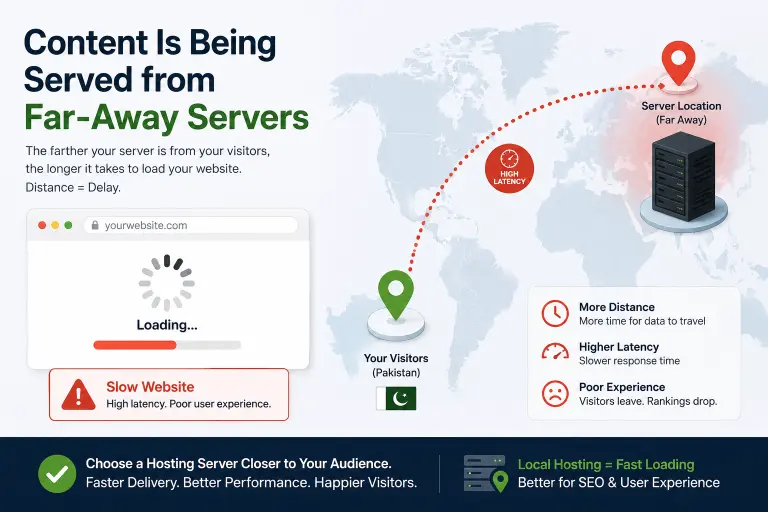
If your hosting server is located in Europe or the United States, every Pakistani visitor incurs a latency penalty per request.
Data physically has to travel across undersea cables to reach the server and return.
For a server in the US, that round trip adds 200 to 300 milliseconds to every request. It does this before WordPress has even started loading the page.
A Content Delivery Network (CDN) solves this by caching your site’s static assets like images, CSS, JavaScript files, across servers in dozens of locations worldwide.
When a visitor in Lahore loads your site, those assets are served from the nearest CDN node rather than your origin server.
Cloudflare’s free plan is the most widely used starting point.
For even better results, choose a host that integrates CDN at the server level.
Truehost includes global CDN infrastructure as part of its WordPress hosting, so the benefit is applied automatically without extra configuration.
Start With the Right Host and Fix Everything Else From There
Every fix in this guide is worth implementing.
Compressed images, proper caching, a lean plugin stack, a clean database, and a CDN will all make a measurable difference to your site’s speed.
But if the server your site runs on is overcrowded, outdated, or simply using outdated technology, you are building on a weak foundation.
The improvements are limited by the ceiling the host sets.
That ceiling is why the host matters more than any individual optimisation technique.
Our WordPress hosting for Pakistan runs on LiteSpeed servers with NVMe SSD storage, includes free SSL, daily backups, one-click WordPress installation, and 24/7 support.
Plans start at PKR 1,500 per year, less than many Pakistani freelancers charge for a single hour of work.
Start with the right host. Apply the fixes above.
Run your site through GTmetrix or PageSpeed Insights before and after.
That visitor who was watching your page load for five seconds while you held your breath? They will not get the chance to be impatient again.